Getting Started with BlogShake
Posted on
This blog is built with BlogShake — an unopinionated static site generator (SSG) built upon Shake, a build system written in Haskell. It is not a framework or a platform. It sets the bare minimum pattern for building an SSG over Shake, and expects you to learn and extend it to fit your needs.
That said, even without any extension, this is a perfectly working SSG. It produces a blog with posts, standalone pages, tag archives, and an Atom feed.
This post explains how it works and how to use it.
Prerequisites
BlogShake is run with Magix, which provisions the dependencies with Nix underneath and compiles the script into a binary the first time you run it, caching the result. You need Nix installed, then Magix:
nix profile install github:dschrempf/magixIf you’d rather not install Magix, you can run it directly:
nix run github:dschrempf/magix#magix -- ./blog.hs buildOnce Magix is set up, the script runs directly as shown below.
Quickstart
Run:
./blog.hs buildThe site is generated in the _site directory. You can
run python3 -m http.server -d _site to start an HTTP
server, and browse your website.
To enable parallel builds:
./blog.hs build -j4Clean the output:
./blog.hs cleanRun ./blog.hs --help to see all Shake build options
(parallelism, progress reporting, profile, etc.).
Continuous Build
For automatic rebuilds on file changes, use entr:
brew install entr  # macOS
git ls-files | entr -c ./blog.hs build
In a different terminal, run
python3 -m http.server -d _site to serve the website.
Project Structure
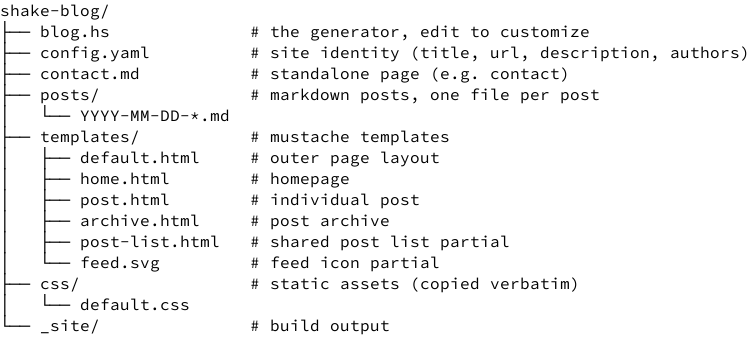
Configuration
Edit config.yaml to set your blog’s title, URL,
description, and authors:
title: My Blog
url: https://example.com
description: A blog about things.
authors:
  - name: Your Name
    uri: https://example.com/about/
    email: you@example.com
    copyright_year: "2026"
The generator requires at least one author.
Customizing the Generator
The build settings live at the top of blog.hs in the
Settings section:
| Setting | Default | Description |
|---|---|---|
outputDir |
"_site" |
Where the generated site goes |
assetGlobs |
["css/*.css", "images/*.png", "images/*.svg", "images/*.jpg"] |
Patterns for static files to copy verbatim |
postGlobs |
["posts/*.md"] |
Glob pattern for finding post source files |
pagePaths |
["contact.md"] |
List of standalone Markdown page sources
(e.g. ["about.md", "contact.md"]) |
archivePath |
"archive" |
Subdirectory for the post archive |
tagArchivePath |
"tags" |
Subdirectory for per-tag post listings |
homePostCount |
5 |
Number of recent posts shown on the homepage |
feedFileName |
"feed.atom" |
Name of the Atom feed file |
Everything else in blog.hs is meant to be read and
modified as your site grows; add new page types, change the URL
structure, wire in new Shake rules. See BlogShake
Features in Detail for a tour of features.
Output
Running ./blog.hs build produces this site structure
under the output directory (_site by default):
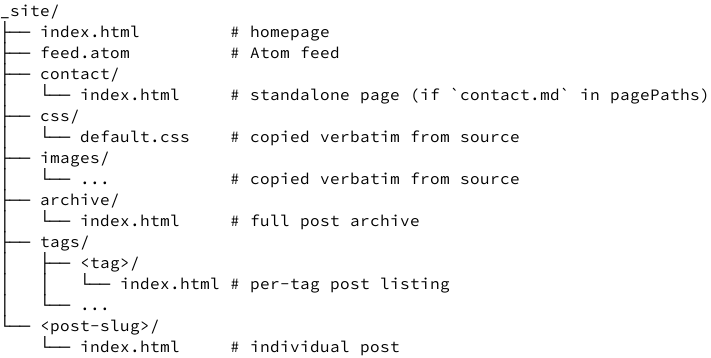
Each post and standalone page gets its own directory with an
index.html so URLs are clean
(e.g. /my-first-post/ or /contact/).
Writing Posts
Posts live in posts/ as Markdown files with YAML front
matter. The filename must start with
YYYY-MM-DD-.
---
title: My first post
author: Your Name          # optional; defaults to the first author in config
tags:
  - haskell
  - shake
---

Post content goes here.
Template Variables
Post pages receive:
| Variable | Description |
|---|---|
title |
Post title |
author |
Post author (if set in front matter) |
tags |
List of tags |
date |
Formatted date (e.g. July 17, 2026) |
date_time |
ISO-8601 date (e.g. 2026-07-17T00:00:00Z) |
content |
Post body as HTML |
url |
Absolute URL of the post |
base_url |
Site base URL (empty in dev, config.url in prod) |
site |
Full site config object |
The site object exposes site.title,
site.url, site.description,
site.author (first author), and site.authors
(all authors) variables.
Page (non-post) templates receive site,
base_url, title, main_class, and
content variables.
main_class is a CSS class name set per-page by the
generator (e.g. "post", "page",
"home", "archive"). It is set on
<main> in the default template, letting you style
different page types differently without extra template logic.
Environment and
base_url
Set ENV=PROD when building for deployment:
ENV=PROD ./blog.hs buildIn PROD mode, base_url is set to the
url from config.yaml, so all links point to
your live site. When ENV is unset or set to anything else
(e.g. the default DEV), base_url is empty and
links are relative. This means you can preview the site locally, and the
same build produces absolute URLs when deployed.
Hosting on GitHub Pages
See the post on hosting on GitHub Pages for instructions on deploying the blog with GitHub Actions and Pages.